

Major Innovation in Android Backup System
Google updates Android backup settings, introducing new controls that allow users to make different backup preferences for each application.
Following the interface renewal last year, Google took an important step to make the Android backup system more user-oriented. The technology giant has started to introduce new application-based controls that allow users to manage backup preferences separately for each application on their devices.
This feature, which can now be accessed on Pixel devices via Settings > Accounts and backup > Google Backup > Other device information, allows users to have more detailed control over what information will be stored on the cloud. This innovation, distributed with version 26.24 of Google Play services, makes existing backup processes more transparent and manageable.
- Users can now individually choose which applications’ information will be backed up in their Google accounts.
- Although all applications start in backup mode by default, these settings can be easily disabled if desired.
- The new feature is currently active on Pixel devices and is not currently seen on phones from other manufacturers such as Samsung.
Users will no longer have to fill up their Google storage space by backing up unnecessary application information.
Application Data is Becoming More Transparent
Previously, Google only showed the total number of applications and the overall amount of storage they took up in the backup menu. With the new update, the top three applications that consume the most information are clearly listed in the backup details.
Users can list all the apps on their devices by clicking “Show more” and personalize the backup preference using the switches next to each item.
When you turn off the backup of an application, an informative warning screen appears stating that the existing information about that application will be deleted from your Google account.
Controls Do Not Cover Device Data
It is worth noting that this new control system only affects third-party applications.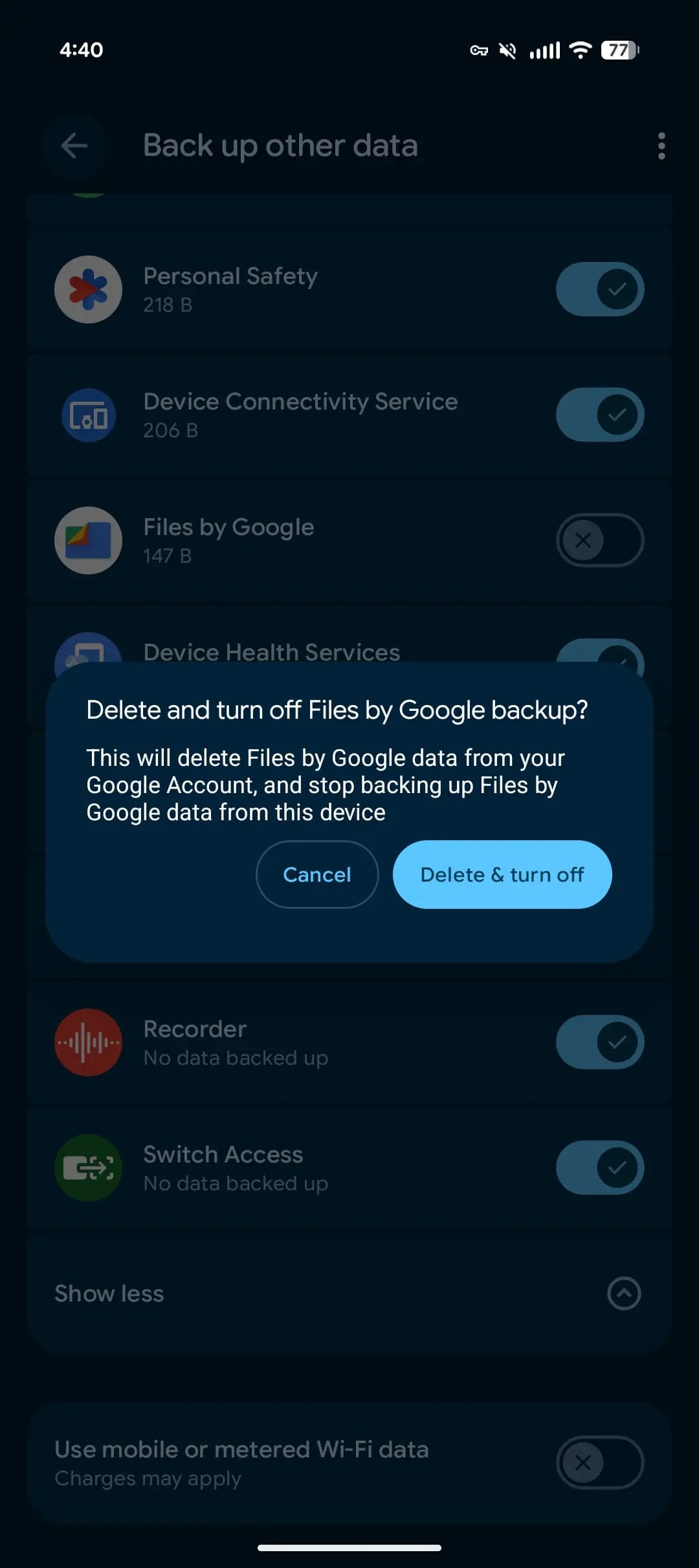
Basic information such as text messages (SMS and MMS), call history and device settings in the device’s own backup section are outside the scope of this new application-based management. This distinction is preferred to protect the security and integrity of system data.
The new feature works smoothly on current devices running Android 16 and 17 versions.
Google One Design is Renewed
In addition to these improvements in the backup system, the Google One application also recently received a visual update.
The application, which switched to the Material 3 Expressive design language last year, gained an edge-to-edge design approach with the update this month.
This change improves the visual experience by ensuring that the application’s status and navigation bars now integrate more harmoniously with the overall interface.
How effective do you think app-based backup controls will be in managing Google storage space? Have you started to see this feature on your own device? Share your opinions with us in the comments!


